


1. Clients Overview
Welcome to our Knowledge Base
Managing your clients is very easy and intuitive. The place to start is the Client List Page.
You access this page via the main menu:
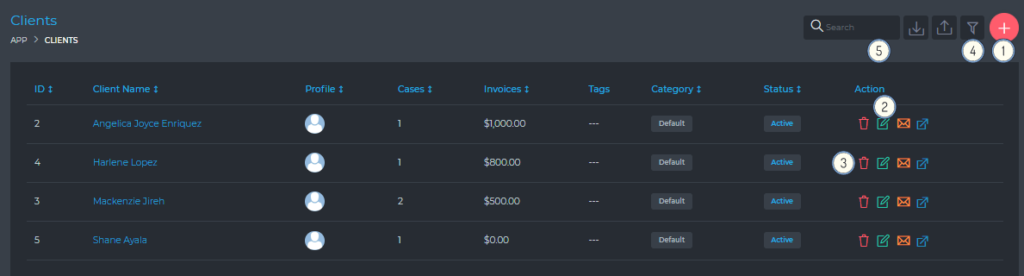
From this page, you are able to view and do the following:
- (1) Create a new client account
- (2) Edit an existing client account
- (3) Delete a client account
- (4) Filter clients, using a detailed filter panel.
- (5) Search your cases, using the free text search box.
- See the most important summary information about your clients:
- The client’s ID
- The client’s company name
- The main contact/account owner for the client account
- The number of cases the client has
- The total value of invoices raised with the client
- Tags, which are useful for quickly identifying key attributes about your client
- Client category, which is helpful for classifying your clients (e.g. Visit, PR, PGWP)