


1. Expenses Overview
Welcome to our Knowledge Base
The expenses feature allows you to record all your business expenses. You can record expenses that you incur on client’s cases or expenses you incur in the operation of your business.
The best place to start is the Expenses page.
Expenses incurred on client cases can be invoiced to the client.
:: Main Menu > Sales > Expenses
Managing Expenses
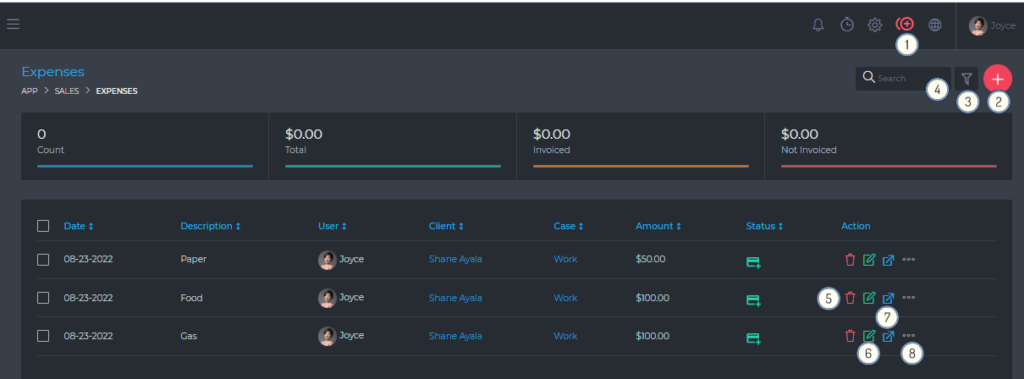
From this page, you are able to view and do the following:
- (1) & (2) Record a new expense.
- (3) Filter expenses, using a detailed filter panel. You can filter expenses by dates, categories, statuses, etc.
- (4) Search your expenses, using the free text search box.
- (5) Delete an expense.
- (6) Edit an expense.
- (7) View an expense.
- (8) Additional expense management settings, via the quick actions button.
Recording Expenses
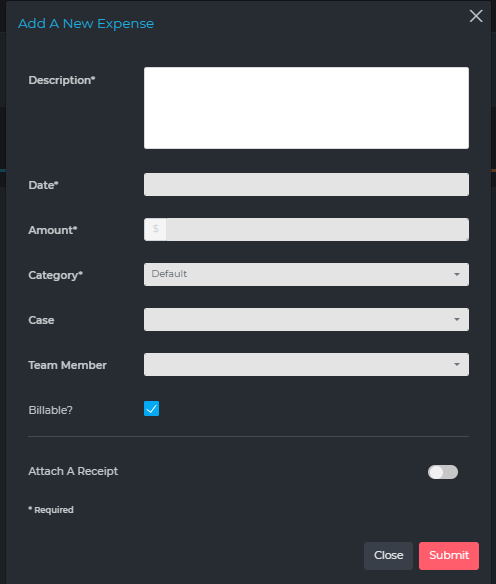
Basic information
- Description
- Date
- Amount
- Category
- Billable
- Select this option to enable you to invoice this expense.
- Client
- For internal, and business expenses, you can leave this blank
- Cases
- For internal, and business expenses, you can leave this blank
- Attach A Receipt