1. Invoices Overview
Welcome to our Knowledge Base
My Dask CRM makes getting paid by your clients very easy and efficient. You are able to bill your clients in a variety of ways. From one-time invoices to recurring invoices, we have made the process easy and intuitive.
The place to start is the invoices pages.
:: Main Menu > Sales > Invoices
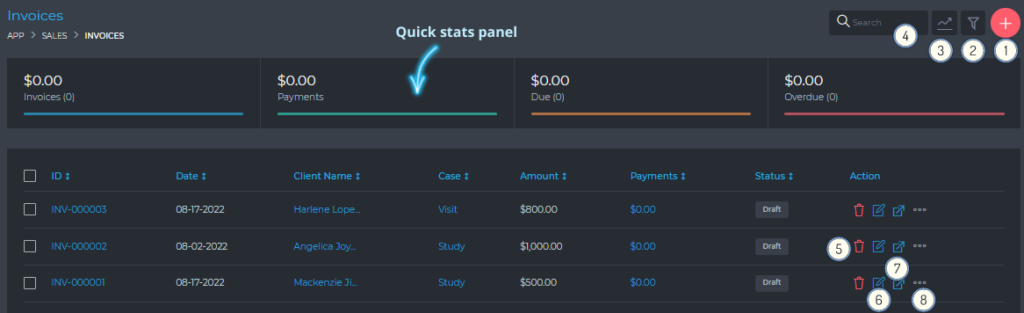
From this page, you are able to view and do the following:
- (1) Create a new invoice
- (2) Filter invoices, using a detailed filter panel. You can filter invoices by dates, categories, statuses, etc.
- (3) Toggle (hide/show) the Quick Stats panels
- (4) Search your invoices, using the free text search box.
- (5) Delete an invoice
- (6) Edit an invoice
- (7) View an invoice
- (8) Additional invoice management settings, via the quick actions button.