

Prospects Overview
Prospects are your business opportunities. They are the contact information of people or organizations that have expressed an interest in your company’s product offering. Your organization can then use further marketing and promotional tools to convert those potential customers into paying customers.
My Dask CRM allows your team to properly keep track of all information and conversations, whilst nurturing the prospects into a customer.

Using the main actions panel (as shown above) you are able to do the following:
- (1) (2) Create a new prospect.
- (3) Filter prospects.
- (4) Import prospects
- (5) Sort prospects (e.g. sort by due date).
- (6) Toggle between list view and kanban board view.
- (7) The admin user can select to either view only the prospects that they are assigned to or to view all prospects.
- (8) This will show archived prospects
- (9) The free text search box, allows you to quickly find specific prospects.
Kanban View
The dashboard allows you to view prospects as a list or as cards on a kanban board. You can easily change between these two viewing modes at any time. The dashboard also remembers your viewing preferences, so you do not need to keep changing them every time.
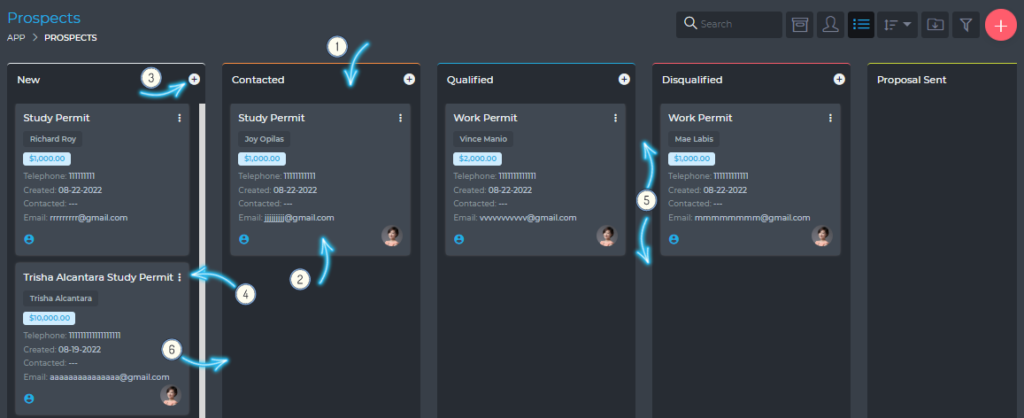
The kanban view has the following features:
- (1) Kanban board
- The Kanban board is a workspace that denotes a prospect’s progress. As you make progress on a prospect, you can drag it from one board to another.
- (2) Prospect cards
- Each prospect is represented by a card. The face of this card has some basic/summary information about the prospect. To work on the prospect, simply click the card and you will get a full view of the prospect.
- (3) Add a new prospect button
- (4) Quick editing button.
- (5) You can change the position of a prospect by simply dragging it up or down.
- (6) As work progresses on the prospect, you can move it from one board to the next, by simply dragging and dropping it.
List View
You can also view prospects in a simple table format, as shown below.
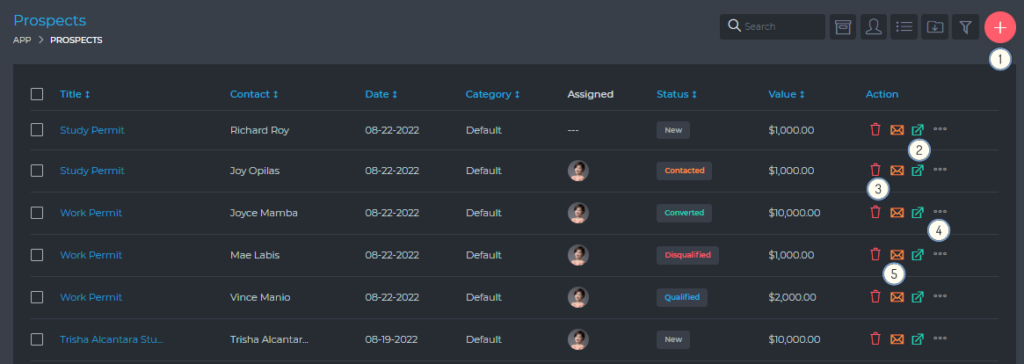
From the table list view, you are able to do the following:
- (1) Create a new prospect
- (2) Open a prospect
- (3) Delete a prospect
- (4) Edit a prospect
- (5) Send email to a prospect
Most of the actions on a prospect can only be carried out by users assigned to the prospect.
Working On A Prospect
When you open a prospect, you are presented with a view as shown below:
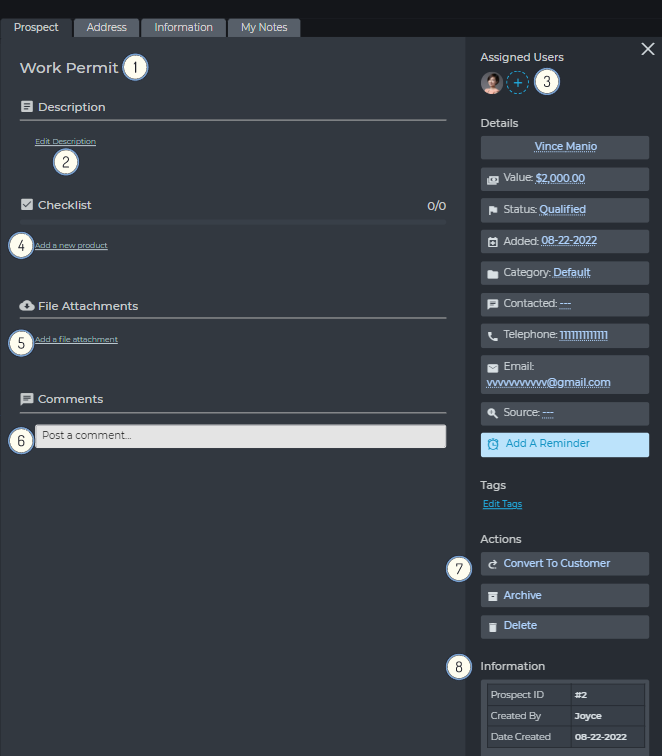
My Dask CRM makes working on your prospects very easy and intuitive. You are presented with a clean, user-friendly working space, where you are able to do the following:
- (1) Edit the prospect title.
- (2) Edit the prospect description.
- (3) Assign different team members to the prospect.
- (4) Create and complete checklists.
- (5) Attach files to the prospect.
- (6) Comment and collaborate with team members.
- (7) Convert a prospect to a customer
- (8) A summary view of key prospect details/attributes